How to Redeem an App Store Promo Code on your iPad
Congratulations! You received a promo code to download an app for free. Your promo code can only be used to download a specific app one time only. Promo codes will expire 28 days from the day they are generated so redeem your code within that window of time to be sure that you can get the app downloaded successfully.
So, HOW do you redeem the promo code? Simply follow these steps:
Step 1.
First make sure your iPad is connected to the Internet.
Step 2.
Open the App Store on your iPad.

Step 3.
Scroll to the bottom of the App Store and tap the “Redeem” button.

Step 4.
Sign in to the App Store with your Apple ID (if the prompt appears).

Step 5.
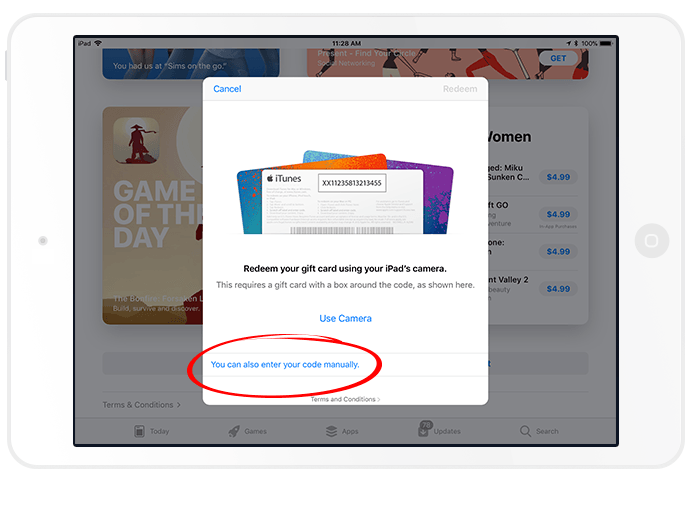
Tap the text that reads “You can also enter your code manually.”
Step 6.
Enter your promo code then tap the “Redeem” button at the top right.

Step 7.
When you get the message stating that you’ve redeemed your app successfully, tap the “Done” button.

Step 9.
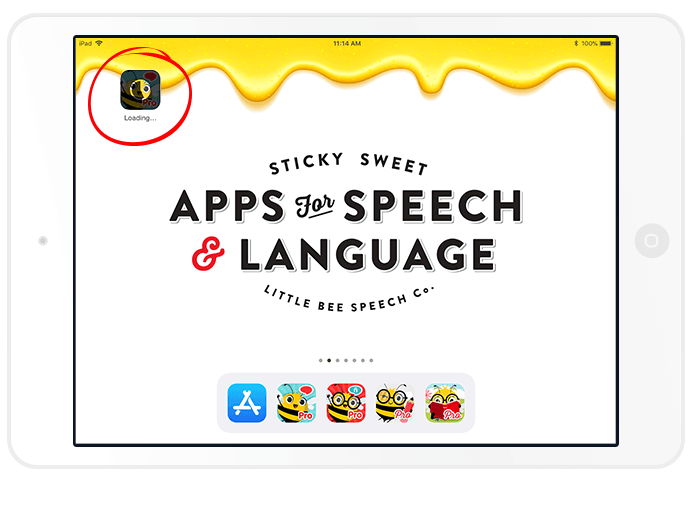
Go to your home screen and watch your app finish downloading with much anticipation. 🙂
Step 10.
Congratulations on your new (free) app. Open and enjoy!

Step 11.
Download and review the free (lite) version. Apple will not allow you to review the app you just downloaded on the App Store since you downloaded it for free using a promo code. However, once you’ve had some time to use the app you’ve just downloaded please consider downloading the free (or lite) version of the same app and rate and review it in the App Store. This will help others learn from your experience using the app and will help us spread the good word about our apps.
Reviewing an app is easy to do. Check out our tutorial: “How to Rate and Review an App on the App Store.”
